Monthly subscription
€9.99
per month
- Lower initial cost
- Recurring subscription
- Best for a route test
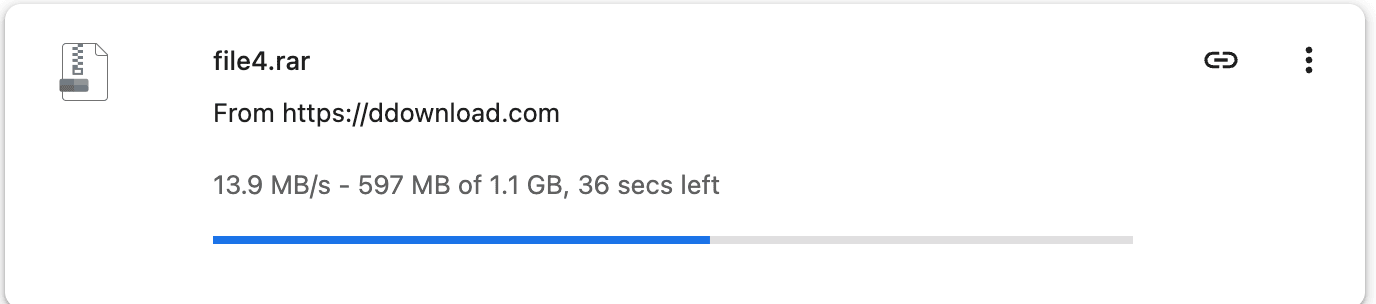
Premium is useful when a DDownload link is too large to tolerate free-mode waiting and throttling. Our browser test moved from 89.6 KB/s free to 13.9 MB/s Premium. That is a major practical difference, but it is a measured result—not a speed guarantee.
Plan details checked 22 August 2026. Prices and payment fees can change at checkout.
Premium was about 155 times faster than free access in these two test sessions.
Current pricing
DDownload now labels Premium access “Ultimate.” The service level is the same; the payment structure and term differ.
Monthly subscription
€9.99
per month
12-month subscription
€39.99
€3.33/month equivalent
30-day one-time payment
€14.99
no automatic renewal
These were the prices displayed on DDownload’s own pricing page on 22 August 2026. CashToCode and other payment routes may carry a higher total. Confirm the final amount and renewal wording before paying.
What you are paying for
Free access can be enough for one small file. In our test, however, it ran at 89.6 KB/s and showed roughly nine minutes remaining for a 48 MB file. Large archives become impractical at that rate, especially when another file triggers a fresh countdown, verification step or cooldown.
Ultimate removes the deliberate free-speed cap, supports parallel downloads and direct starts, and advertises 200 GB of traffic per day. It also works with download managers such as JDownloader 2. Those are workflow improvements: fewer manual steps and a better chance of using the bandwidth your route can deliver.
The important caveat is routing. A Premium browser download reached 13.9 MB/s on our connection; four simultaneous Chrome downloads previously reached roughly 45 MB/s combined. A separate VPS/JDownloader session reached 123.78 MB/s combined. Those numbers differ because the network path and test machine differ.
Direct evidence
At a glance
The table combines our measured speeds with the current features published by DDownload.
| Check | Free | Ultimate |
|---|---|---|
| Browser speed in our test | 89.6 KB/s | 13.9 MB/s |
| Start process | Countdown and checks | Direct start available |
| Parallel downloads | Restricted | Supported |
| Daily traffic | Limited in practice | 200 GB advertised |
Practical verdict
If you already have several large DDownload links, split RAR parts or a queue you want to run through JDownloader, the saved waiting time can justify a short plan. The annual price is attractive only after you know the route performs well.
If you need one small file, rarely use the host or have not confirmed that the file is still available, pay nothing first. A Premium account cannot repair a deleted file or guarantee that every server route will saturate your connection.
One sensible next step